
- Tips
- technology
- Frequently Asked Questions
- Tests
- mAh capacity
- Rated Capacity
- comparison
- everActive
- Batteries vs rechargeable batteries
- Accumulated energy
- Durability of rechargeable batteries
- Efficiency of rechargeable batteries
- battery voltage
- LR03 AAA
- LR6 AA
- eneloop
- AG13 LR1154 LR44
- CR 2032
- Delta V
- Charge Cycles
- internal resistance
- charge level
- memory effect
- accredited test
- SR44 357
- Hearing Batteries 675
- SR626 377
- Watch Batteries
- Polarity
- Mah
- passivation
- LS 14250
- LS 14500
PENDRIVE (commonly: Pen Drive) - what are they and what types are there?


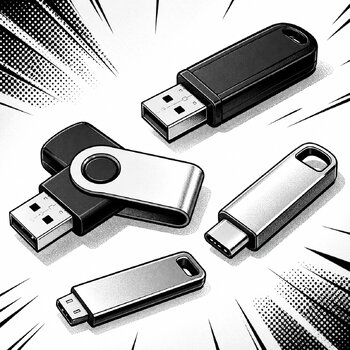
The pendrive initially offered capacities comparable to those of floppy disks, but the rapid technological development of flash memory has caused its capacities to quickly surpass ZIP drives, and it is now comparable to hard drives. Currently (2019), pendrives with capacities up to 4 TB can be found.
The pendrive is a portable Plug&Play device - it is most often connected to the computer directly via a USB port, so it does not require additional accessories such as a docking station or an additional computer drive. The speed depends on the USB version (1.1, 2.0, or from 2010, 3.0) and the speed of the applied Flash memory. The current sizes of modern devices called "mini" do not exceed double the size of the USB connector. Older models were usually equipped with a characteristic write protection and erase switch similar to that of floppy disks.
Pendrive – what is it, what types are there, and how to choose a USB memory?
A pendrive, also known as a pen drive, USB memory, or flash drive, is a small portable data storage device based on flash memory. It is used for saving, transferring, and archiving files: documents, photos, videos, music, presentations, backups, or operating system installers.
It is most often connected directly to the USB port of a computer, laptop, television, console, car radio, or other multimedia device. This makes the pendrive easy to use and does not require additional power or a docking station.
Modern pendrives differ not only in capacity but also in connector type, USB standard, read and write speed, casing type, and purpose. One model may be suitable for office documents, while another may be better for videos, photos, mobile work, system installation, or playing music in a car.
What is a pendrive?
A pendrive is a portable flash memory connected to a device via a USB port. Once plugged into a computer, it usually operates in Plug & Play mode, meaning it is automatically detected by the operating system and ready for use without installing additional software.
In practice, a pendrive serves a similar function as a small external hard drive, but it is usually smaller, lighter, and more convenient for everyday carrying. It can be hidden in a pocket, wallet, bag, case, or attached to keys.
The term pen drive is sometimes used interchangeably with the term pendrive. In Polish stores and search engines, the term “pendrive” is more commonly found, but many users still also type “pen drive.”
What is a pendrive used for?
A pendrive has many applications, both for home and business use. It is most often used for quickly transferring data between devices.
Typical uses of USB memory include:
- transferring documents, spreadsheets, presentations, and PDF files,
- saving photos and videos,
- playing music in a car,
- playing multimedia files on a television,
- creating backups of important files,
- preparing a bootable drive with Windows or Linux,
- transferring materials between a computer, laptop, and phone,
- archiving business data,
- delivering materials to clients, employees, or training participants.
Compared to transferring files over the internet, a pendrive has one significant advantage: it does not require a network connection. This is a convenient solution when files are large, the internet is slow, or data needs to be transferred without using the cloud.
Types of pendrives
Pendrives can be divided into several groups. The most important differences concern the connector, casing design, transfer speed, and purpose.
USB-A Pendrive
This is a classic and still very popular type of pendrive. It has a rectangular USB-A connector that fits most desktop computers, older laptops, televisions, consoles, decoders, car radios, and many office devices.
A USB-A pendrive will be a good choice if you want to use it mainly with a computer, television, or car.
It is best suited for:
- documents,
- music,
- photos,
- videos,
- simple backups,
- system installers,
- daily file transfers.
USB-C Pendrive
A USB-C pendrive has a smaller, symmetrical connector that can be plugged in either way. This type of memory is becoming increasingly popular as many new laptops, tablets, and smartphones use USB-C ports.
However, it is worth remembering that USB-C refers to the type of connector, not automatically to high transfer speed. A USB-C pendrive may operate at different standards, so when purchasing, it is worth checking not only the shape of the plug but also the declared read and write speeds.
A USB-C pendrive is suitable for:
- new laptops,
- tablets,
- smartphones with USB-C,
- quickly transferring photos and videos,
- mobile work,
- transferring data between a computer and a phone.
Dual USB-A + USB-C Pendrive
This is a very practical solution for people who use both older and newer devices. Such a pendrive has two connectors: classic USB-A and USB-C.
This allows it to be connected, for example, to a computer with a USB-A port, and then to a phone or laptop with USB-C. It is a good choice for users who frequently transfer files between different devices.
You should choose a USB-A + USB-C pendrive if:
- you use both an older computer and a new laptop,
- you want to transfer photos from your phone to your computer,
- you need one universal storage device,
- you often work outside the office.
Rotating Pendrive
A rotating pendrive has a movable metal cover that protects the USB connector. Its advantage is the absence of a classic cap, which is easy to lose. This is one of the most popular types of designs.
Advantages of a rotating pendrive:
- practical connector cover,
- no separate cap,
- convenient carrying,
- often sturdier construction,
- attractive appearance.
This is a good choice for everyday use at home, school, office, and business.
Mini Pendrive
A mini pendrive is very small in size. When plugged into a USB port, it hardly protrudes from the device, making it suitable for use in a car, laptop, television, or console.
A mini pendrive is worth choosing for:
- car radios,
- laptops,
- televisions,
- consoles,
- devices where the storage needs to be connected for a longer time.
However, it should be noted that a very small pendrive is easier to lose, so for everyday carrying in a pocket or bag, a model with a keyring hole may sometimes be more convenient.
Metal Pendrive
A pendrive with a metal casing is usually more resistant to mechanical damage than a plastic model. It works well in mobile work, travel, and everywhere the storage often ends up in a pocket, bag, or backpack.
A metal casing can also be a good choice for companies that want to buy pendrives as practical storage devices for delivering materials to clients or employees.
USB 2.0, USB 3.0, USB 3.2, and USB-C – what are the differences?
One of the most important parameters of a pendrive is the USB standard. It affects the maximum possible data transfer speed. In practice, the actual speed depends not only on the standard but also on the quality of the memory, controller, port in the computer, and the type of files being copied.
The most commonly encountered designations are:
| Standard | Maximum throughput | When is it sufficient? |
|---|---|---|
| USB 2.0 | up to 480 Mb/s | documents, music, small files |
| USB 3.2 Gen 1 / USB 5Gbps | up to 5 Gb/s | photos, larger files, everyday use |
| USB 3.2 Gen 2 / USB 10Gbps | up to 10 Gb/s | frequent copying of large files |
| USB 3.2 Gen 2x2 / USB 20Gbps | up to 20 Gb/s | very fast drives and demanding applications |
In older product descriptions, you may encounter the designations USB 3.0 or USB 3.1. Currently, they are often categorized under the name USB 3.2. However, for the user, the most important thing is not the designation itself but the declared read and write speeds.
It is worth remembering a simple rule:
USB-C is a type of connector, while USB 2.0, USB 3.2 Gen 1, or USB 3.2 Gen 2 are data transmission standards.
This means that a USB-C pendrive does not always have to be very fast. Similarly, a USB-A pendrive can offer high speed if it supports a newer standard and has sufficiently efficient memory.
What capacity should you choose for a pendrive?
The capacity of a pendrive should be matched to the type of files that will be stored on it. A smaller drive is sufficient for documents, but for photos, videos, and backups, it is better to choose a larger capacity.
| Capacity | Who will it be suitable for? |
|---|---|
| 16 GB | simple documents, text files, small presentations |
| 32 GB | school, office, music, basic applications |
| 64 GB | photos, documents, music, daily file transfers |
| 128 GB | videos, larger folders, backups, mobile work |
| 256 GB | large archives, video materials, graphic projects |
| 512 GB and more | intensive work with large files, an alternative to a small external hard drive |
For everyday use, a 64 GB or 128 GB pendrive is usually a good choice. Smaller capacities still work well for documents and music, but a larger drive offers more freedom and does not fill up as quickly.
If the pendrive is to be used for movies, photo backups, or transferring large folders, it is worth considering a model of 128 GB, 256 GB, or larger.
Which pendrive to choose? The most important parameters
When choosing a pendrive, it is worth paying attention not only to capacity. Two models with the same number of gigabytes can significantly differ in speed, casing, and ease of use.
1. Capacity
For documents and simple files, 32 GB or 64 GB is sufficient. For photos, videos, and larger archives, it is better to choose 128 GB or 256 GB.
2. Type of connector
If you mainly use computers, televisions, or car radios, USB-A will be a good choice. If you have a new laptop, tablet, or phone, consider USB-C or a dual USB-A + USB-C model.
3. USB standard
For small files, USB 2.0 is sufficient, but for frequent copying of photos, videos, and larger folders, it is better to choose a USB 3.2 pendrive.
4. Read and write speed
Read speed indicates how quickly the device reads data from the pendrive. Write speed informs how quickly files can be copied to the storage. With large files, the difference between a slow and a fast pendrive can be very noticeable.
5. Casing
For mobile work, it is worth choosing a sturdy casing, such as metal or rotating. For a car and television, a compact mini pendrive may be a good choice.
6. Brand
It is worth choosing pendrives from reputable manufacturers, such as Kingston, GoodRam, or SanDisk. A branded storage device usually means better build quality, predictable speed, and greater reliability.
Pendrive for a car – which one to choose?
A pendrive for a car should primarily be small, convenient, and compatible with the radio or multimedia system. In many cases, a 32 GB or 64 GB model will suffice, especially if it is mainly used for playing music.
A compact USB-A pendrive that does not protrude much from the port will be a good choice. This makes it less likely to be accidentally snagged or damaged.
When choosing a pendrive for a car, it is worth paying attention to:
- small size,
- simple design,
- capacity of 32–64 GB,
- compatibility with the car radio,
- file system supported by the device.
If the car radio does not see the pendrive, the problem may not be the storage itself, but the file format, file system, or too large capacity for an older device.
Pendrive for a television – which will be the best?
For a television, it is worth choosing a pendrive with a larger capacity, especially if it will store movies, photos, or recordings. A good choice would be 64 GB, 128 GB, or more.
For a television, the following are important:
- capacity,
- compatibility with the file system,
- read speed,
- operational stability,
- size of the casing.
For higher quality movies, it is worth choosing a faster USB 3.2 pendrive. Even if the television itself has an older USB port, a faster storage device may be more convenient when copying movies from a computer.
Pendrive for a laptop and computer
For a laptop and computer, it is worth matching the pendrive to the available ports. Older devices most often have USB-A, while newer laptops increasingly use USB-C.
If the pendrive is to be used for daily file transfers, a 64 GB or 128 GB model will work well. If you often copy large folders, photos, videos, or project files, it is worth choosing a faster USB 3.2 model.
For office work, a simple USB-A pendrive is sufficient. For mobile work, a model with a metal casing or a dual USB-A + USB-C pendrive may be a good choice.
Pendrive for a phone
For a phone, it is best to choose a USB-C pendrive or a dual USB-A + USB-C model. Such storage allows for quick transfer of photos, videos, and documents between a smartphone and a computer.
This is a convenient solution when:
- the phone is running out of space,
- you want to quickly transfer photos to a computer,
- you do not want to use the cloud,
- you need to transfer files without the internet,
- you are recording a lot of videos.
Before purchasing, it is worth ensuring that the phone supports external USB storage devices. In most newer Android devices, this should not be a problem, but specifics depend on the particular smartphone model.
Pendrive for installing Windows or Linux
A pendrive can serve as an installation medium for an operating system. In this case, a so-called bootable pendrive is created, from which the Windows, Linux installer, or service tools can be launched.
For this purpose, a 16 GB or 32 GB pendrive is usually sufficient, but a larger capacity may be more convenient if you want to store additional drivers, programs, or service files on it.
For an installation medium, operational stability is important. It is better to choose a branded pendrive than the cheapest random model.
Is a pendrive suitable for backup?
A pendrive can be used to store copies of the most important files, but it should not be the only place where important data is stored. Like any storage device, it can be damaged, lost, or accidentally formatted.
For simple copies of documents, photos, or work files, a pendrive works well. However, if it concerns very important business data or a family photo archive, it is best to follow the principle of multiple copies: e.g., a pendrive, an external hard drive, and a secure copy in another location.
Data security on a pendrive
A pendrive is convenient, but due to its small size, it is easy to lose. Therefore, it is worth taking care of the security of the data stored on it.
The most important rules:
- do not store the only copy of important files on a pendrive,
- secure confidential data with a password or encryption,
- do not connect found pendrives to a computer,
- regularly check if files can be read,
- safely eject the storage before disconnecting,
- choose a sturdy casing if you often carry the pendrive with you,
- avoid storing the device in places exposed to moisture, high temperatures, or mechanical damage.
For business data, accounting documents, client files, or materials covered by trade secrets, it is worth using encryption. This way, in case of losing the pendrive, an unauthorized person will not easily access the files.
Pendrive or memory card – what to choose?
A pendrive and a memory card serve similar functions, but they are intended for slightly different applications.
A pendrive will be better if you want to quickly transfer files between computers, televisions, cars, or laptops. It is convenient because it has a built-in USB connector and does not require a reader.
A microSD memory card will be a better choice for a phone, action camera, camera, dashcam, or drone. In a computer, it can be used through a memory card reader.
Frequently asked questions about pendrives
What is a pendrive?
A pendrive is a portable flash memory connected to a device via a USB port. It is used for saving, transferring, and reading files such as documents, photos, videos, or music.
Is a pen drive and a pendrive the same?
Yes. In practice, the terms “pen drive” and “pendrive” are used interchangeably. In Polish, the term “pendrive” is more commonly found.
Which pendrive to choose for everyday use?
For everyday use, a 64 GB or 128 GB pendrive in USB 3.2 standard will be a good choice. Such storage will work well for documents, photos, music, videos, and office work.
Which pendrive to choose for a car?
For a car, it is best to choose a small USB-A pendrive with a capacity of 32 GB or 64 GB. A compact casing reduces the risk of accidentally damaging the storage protruding from the USB port.
Does USB-C mean a faster pendrive?
Not always. USB-C is a type of connector, not a guarantee of specific speed. Speed is determined by the data transmission standard, e.g., USB 2.0, USB 3.2 Gen 1, or USB 3.2 Gen 2, as well as the parameters of the storage itself.
Does a USB 3.2 pendrive work in a USB 2.0 port?
Yes, usually a USB 3.2 pendrive also works in a USB 2.0 port, but with a lower speed limited by the older port.
Why does a pendrive have less space than indicated on the packaging?
The difference arises from the way manufacturers and the operating system calculate capacity and from the space taken up by the file system structure. Therefore, a pendrive labeled as 64 GB may show slightly less available space in the system.
Is a pendrive suitable for backup?
Yes, a pendrive can be used for a simple backup of documents, photos, or work files. However, it should not be the only copy of very important data.
Which pendrive to choose for photos and videos?
For photos and videos, it is worth choosing a pendrive of 128 GB or larger, preferably in USB 3.2 standard. This will make copying large files more convenient and faster.
Check pendrives at hurt.com.pl
When choosing a pendrive, it is worth matching the capacity, type of connector, and USB standard to your own needs. For simple documents, a smaller model will suffice, but for photos, videos, and daily work, it is better to choose a faster USB memory with a larger capacity.
At hurt.com.pl, you will find pendrives for various applications: for home, office, school, car, television, and mobile work. Models from well-known manufacturers such as Kingston, GoodRam, and SanDisk are available.
See the category: USB pendrive
See the offer of pendrives at hurt.com.pl
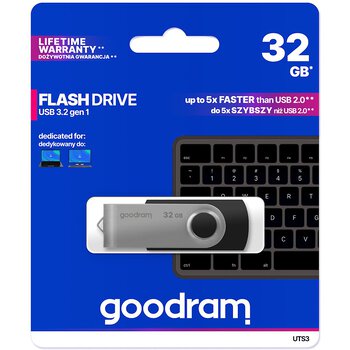
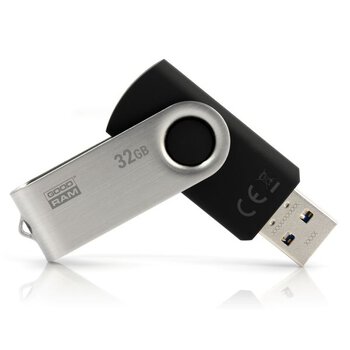
USB 3.2 GoodRam UTS3 32GB Flash Drive
- USB 3.2 Gen 1 (compatible with USB 3.0 / 2.0)
- written speed: up to 20MB/s
- reading speed: up to 60MB/s
- rotating USB locking system
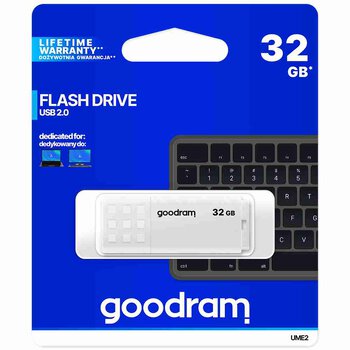
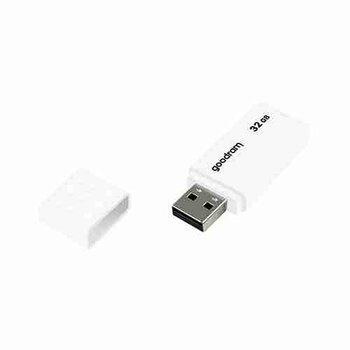
USB 2.0 GoodRam UME2 32GB Pendrive
- USB 2.0 interface
- read speed: up to 20MB/s


USB 3.2 GoodRam UTS3 64GB Pendrive
- USB 3.2 Gen 1 (compatible with USB 3.0 / 2.0)
- write speed: up to 20MB/s
- read speed: up to 60MB/s
- rotating USB locking system